




The Joint Admissions and Matriculation Board (JAMB) has officially released the full guidelines for the 2026 Unified Tertiary Matriculation Examination (UTME) registration.
If you’re planning to register for the 2026 UTME, here is a simple, clear, and detailed breakdown of everything you must know.
ALSO READ: Is Your NIN Linked to a Criminal’s Number? Here’s How to Check Before It’s Too Late 
2026 UTME Registration: Step-by-Step Guide
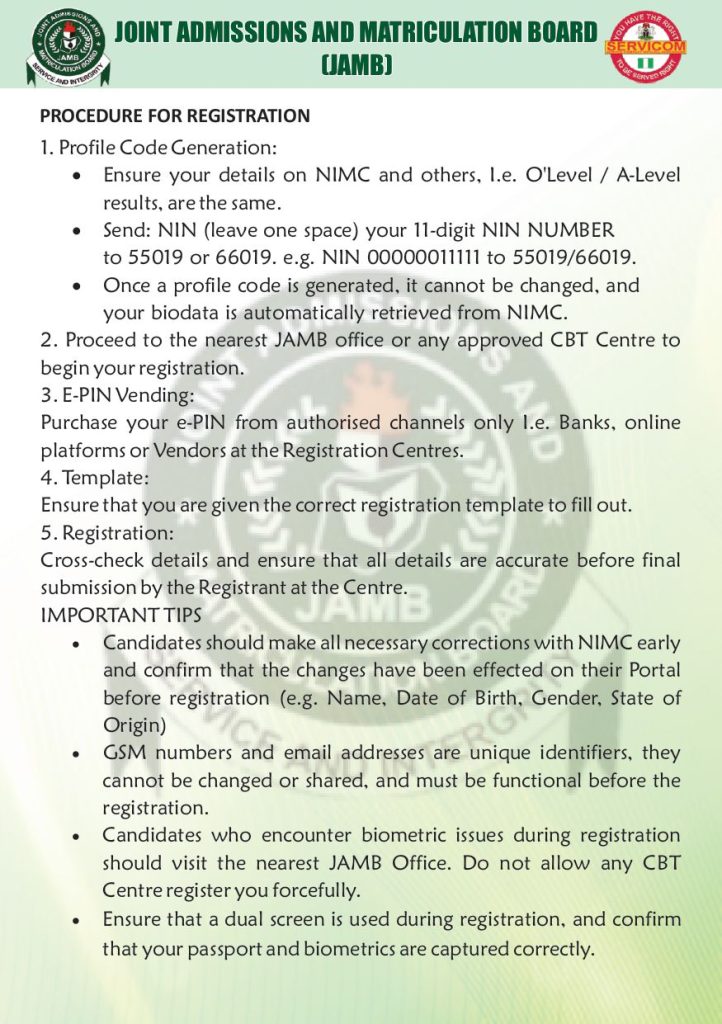
1. Confirm Your Personal Details First
Before generating your profile code, make sure all your personal information is accurate, especially your:
- National Identification Number (NIN)
- Email address
- Phone number
- O’level / A-Level results
JAMB warns that incorrect details may cause serious issues later.
2. Generate Your Profile Code
To generate your profile code, send your 11-digit NIN to 55019 or 66019 in this format:
NIN 12345678901 → send to 55019 or 66019
Important notes:
- Once created, your profile code cannot be changed.
- Your biodata is automatically pulled from National Identity Management Commission (NIMC), so ensure your NIN details are correct before sending the SMS.
3. Visit a JAMB Office or Approved CBT Centre
After receiving your profile code, go to the nearest JAMB office or approved CBT center to begin registration.
Make sure:
- You are given the correct JAMB registration template.
- All details on the template are correct before final submission.
4. Buy Your E-PIN From Approved Channels Only
JAMB strictly warns candidates to purchase their UTME E-PINs only from official outlets such as:
- Banks
- Payment platforms
- Approved vendors at CBT centres
Avoid unapproved sellers to prevent fraud or invalid PINs.
Important Registration Tips for All Candidates

1. Fix Your NIN Details Early
If your NIN has errors in your name, date of birth, gender, or state of origin, correct them at NIMC immediately and wait for the changes to reflect before registering.
2. Use a Functional, Unique Phone Number & Email
Your phone number and email are unique identifiers.
They must:
- Belong to you
- Not be shared with anyone
- Be active and accessible
- Not have been used for another JAMB profile
3. Handle Biometric Issues Correctly
If your fingerprints or biometrics cannot be captured:
- Do not allow any CBT centre to force registration
- Go straight to the nearest JAMB office
4. Confirm Your Biometrics & Passport Photograph
JAMB insists that centres must use a dual screen so candidates can monitor the process.
Check carefully that:
- Your face is clearly captured
- Your fingerprints scan correctly
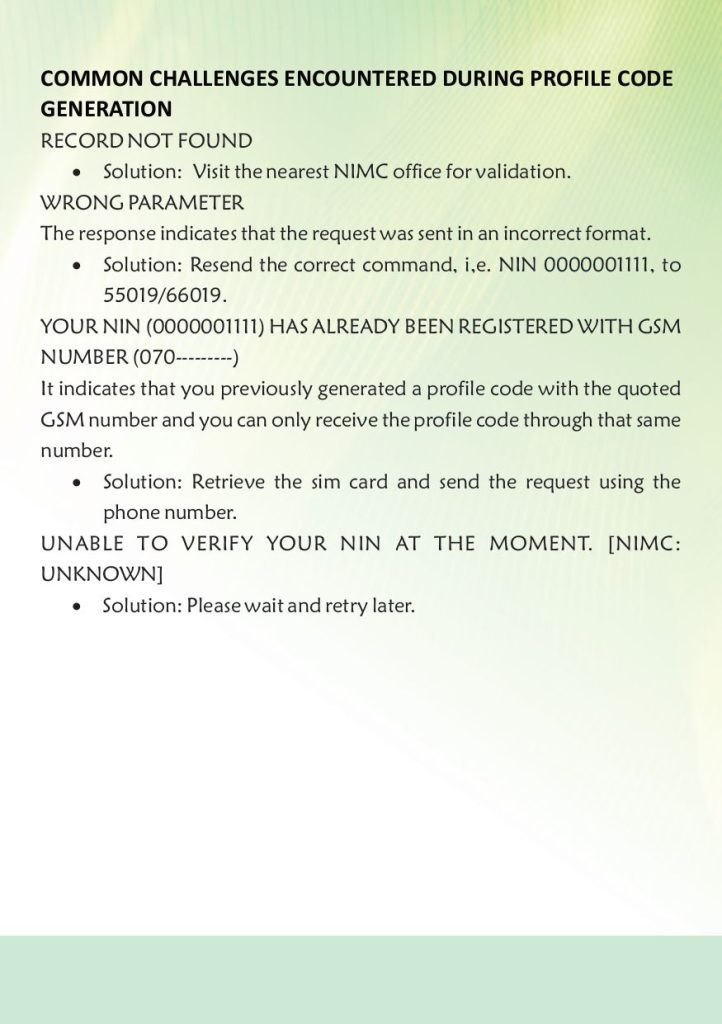
Common Profile Code Problems and How to Fix Them
1. Error 55019/66019
This means your message was formatted wrongly.
Use this correct format:
NIN 12345678901
2. Number Already Registered
This means the phone number is already linked to another JAMB profile.
You must:
- Retrieve the SIM card if possible, or
- Use a new phone number to generate a fresh code
3. Unable to Verify NIN
This usually happens when NIMC servers are slow.
Simply wait and try again later.
2026 UTME Registration Dates
JAMB has confirmed that the 2026 UTME form will be on sale from:
Friday, January 31, 2026 to Saturday, March 8, 2026.
Candidates are encouraged to register early to avoid last-minute rush and technical issues.
YOU MIGHT LIKE: New Lagos Tenancy Bill: 5 Ground-breaking Provisions Tenants Need to Know
About The Author